I used to work as an architectural designer. What I’d like to build now is a language model running locally on a few Macs as the brain, with the Windows PCs on the same network as its hands, doing the actual work in architecture software. That’s still a long way off. This post is about the first piece: getting an AI agent on my Mac to model in Rhino 8 on a Windows PC.
The result is meshlink, a small open-source tool. There’s a demo prerelease, 0.3.0-dev. You install it on the Mac with one command, drag a plug-in into Rhino, and pair the two by checking that both screens show the same six-digit code. After that, Codex on the Mac can work in Rhino over plain SSH. I’ve only tested it on my own PC so far.
I’m not a programmer, and I typed almost none of the code. AI agents wrote it, mostly Claude Code. I decided what to build, ran everything that touched a real machine, and read a lot. There’s a section on what that was like near the end.
Left, Codex on the Mac; right, Rhino on the PC. The prompt was “use rhino to create a model of Parthenon with a 50% level of detail”. Sped up three to six times: in real time the model appeared about ten minutes after the prompt.
Why
In my years as a designer, my projects were mostly offices, commercial buildings and hotels. I usually took them from concept through schematic design, and some through design development. Architecture runs on Windows. Nearly every program in the field supports Windows first and gets its updates there first, so that’s where most of the actual work happens.
Local models are a different story. The open-source community has been working on running open models cheaply on Macs for a long time, and it keeps getting better, while the hardware you need keeps coming down. A Mac’s GPU shares the machine’s memory, and memory is what a big model needs most. exo can pool several Macs into one cluster and split a model across them, and since macOS 26.2, Macs with Thunderbolt 5, the M4 Pro Mac mini among them, can link up over RDMA, which the exo team says cuts the delay between machines by 99%. At the small end, OpenAI says its open-weight gpt-oss-20b runs in 16 GB of memory. To me, that’s much more doable than building the same thing on Windows, and it performs well.
So the plan is to keep the model on Macs and have it use the Windows PCs on the local network, modeling and rendering on several machines at once, at a cost I can control and without project files leaving my own machines. Rhino first; later maybe Revit, AutoCAD and others.
I didn’t want the agent to work through the screen. When I looked at the options in September, the general-purpose route was tools like Windows-MCP, which can drive almost any Windows program. It reads the accessibility tree, the same information screen readers use, and can take screenshots as well. That suits buttons, menus and forms. A 3D viewport is different: the program draws everything in it itself, so to a tool like this it’s mostly pixels. The objects inside have no names, layers or coordinates it can read, and picking one out usually means clicking a spot on the screen. (Its own README lists a similar limit with text: because it works through the accessibility tree, it can’t select part of a paragraph.) Modeling needs to read the model exactly and select exactly the right object, so going through each program’s own MCP server, which works with the model from inside the program, is the more reliable way.
For Rhino that server already exists. rhinomcp by Jingcheng Chen is a Rhino plug-in plus an MCP server that lets an AI client read the document, create geometry and run Python or C# in Rhino. It assumes the client and Rhino are on the same machine. Mine aren’t.
One caveat up front. Today the agent on my Mac is Codex, which talks to a model in the cloud, so for now whatever Rhino tells the agent goes to that model too. The local model comes later. The link between the Mac and the PCs is needed either way, so I started there.
First, just SSH
rhinomcp has no authentication of its own. Anyone who can reach its port can run code in Rhino, so putting that port on the network was never an option. SSH already handles authentication, host keys and encryption, and the boundary it draws is one people already understand: whoever holds the key can act as that Windows account. I had no interest in building my own channel.
The first version that worked used an SSH port forward. rhinomcp ran on the Mac and reached Rhino through a tunnel to the PC. One evening in late September, from a little after eleven until just past midnight, Codex built a truck in Rhino this way. It queried the document, ran C# scripts, captured viewports, and saved two files with 711 and 1,204 objects, none of them invalid.
The problem was that a tunnel has to run all the time. Someone has to start it, notice when it dies, and stop it. That someone turned out to be the agent (more on that below).
Now the default is to run rhinomcp on Windows and let ssh carry its input and output back to the Mac. The MCP client’s entry is just an ssh command:
ssh -T -o BatchMode=yes rhino-pc "set RHINO_MCP_TIMEOUT=30&& <path>\rhinomcp.exe"The first handshake takes one to three seconds; after that a call takes a tenth to a third of a second. The connection lives exactly as long as the Codex session. Quit Codex and both ends are gone within seconds, so nothing is left running and there’s nothing for an agent to start by itself.
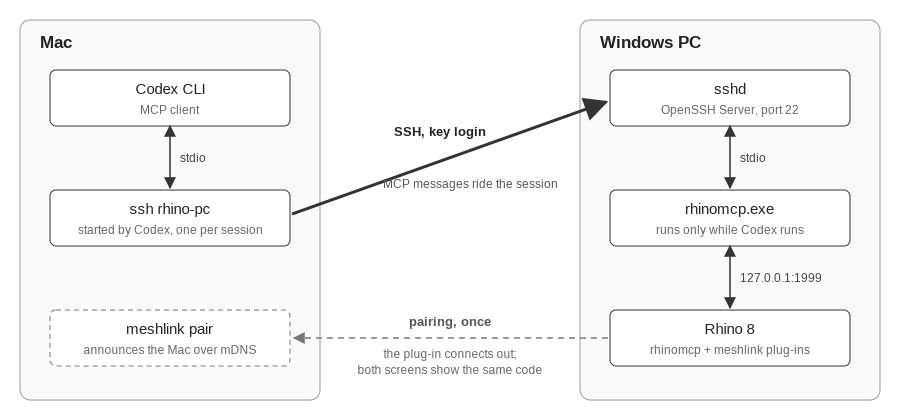
It has a cost. If the network drops, Codex doesn’t bring the connection back, and I have to quit and restart it. The tunnel used to reconnect on its own.
Two constraints shaped the rest of the code. The Mac side uses only the bash 3.2 that ships with macOS, and the Windows side uses Windows PowerShell 5.1. Nobody has to install anything before the installer, and the price is bash that avoids everything from the last fifteen years.
The command-line tool became meshlink setup (key, ~/.ssh/config entry, host key), meshlink client codex (points Codex at the PC) and meshlink doctor, which checks every hop without changing anything and ends with one real tool call. A PowerShell script prepares the PC in one elevated run.
Then, pairing
About two weeks in, with the basic connection working, I wrote down what I actually wanted: install something once on each machine, start pairing on the Mac, say yes in Rhino, and from then on the agent just works. Manual setup still meant pasting a public key into an elevated shell on the PC and comparing a host-key fingerprint by eye. Pairing replaces both.
meshlink pair announces the Mac on the local network over mDNS and waits. The meshlink plug-in in Rhino finds it through the DNS-SD API built into Windows, shows a dialog, and makes the connection itself. Since the PC connects out, pairing needs no new inbound port on Windows and there’s no firewall prompt. (SSH itself still needs port 22, and pairing sets up that rule.)
The exchange works like numeric comparison in Bluetooth. The PC goes first and sends only a hash of its host key and a random number. Then the Mac sends its own key and random number, and only after that does the PC reveal its key. Both sides compute a six-digit code from everything exchanged, and you check that the two screens match. Someone in the middle would have to commit to their numbers before seeing ours, so each try has about a one-in-a-million chance, and a failed try shows up as two different codes.
That only helps if you actually look. Click Allow without comparing and you’re not protected at all. Anyone on the network can also make the dialog pop up on your PC; they just can’t get a key installed. I didn’t use a PAKE such as SPAKE2, because the Mac side can only rely on what ships with macOS, and that’s not enough to do one in bash 3.2.
Once both sides confirm, it’s plain SSH again. The plug-in runs the same PowerShell script, elevated, to install the Mac’s key. The Mac trusts the PC only when the address it’s about to use presents exactly the host key it paired with.
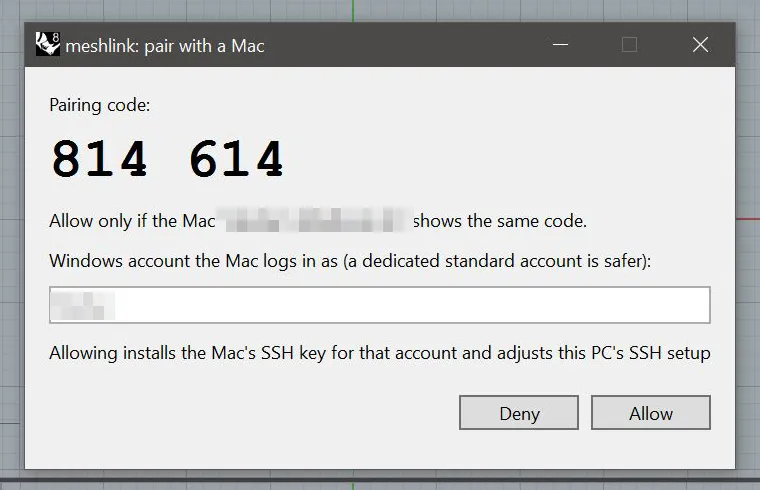
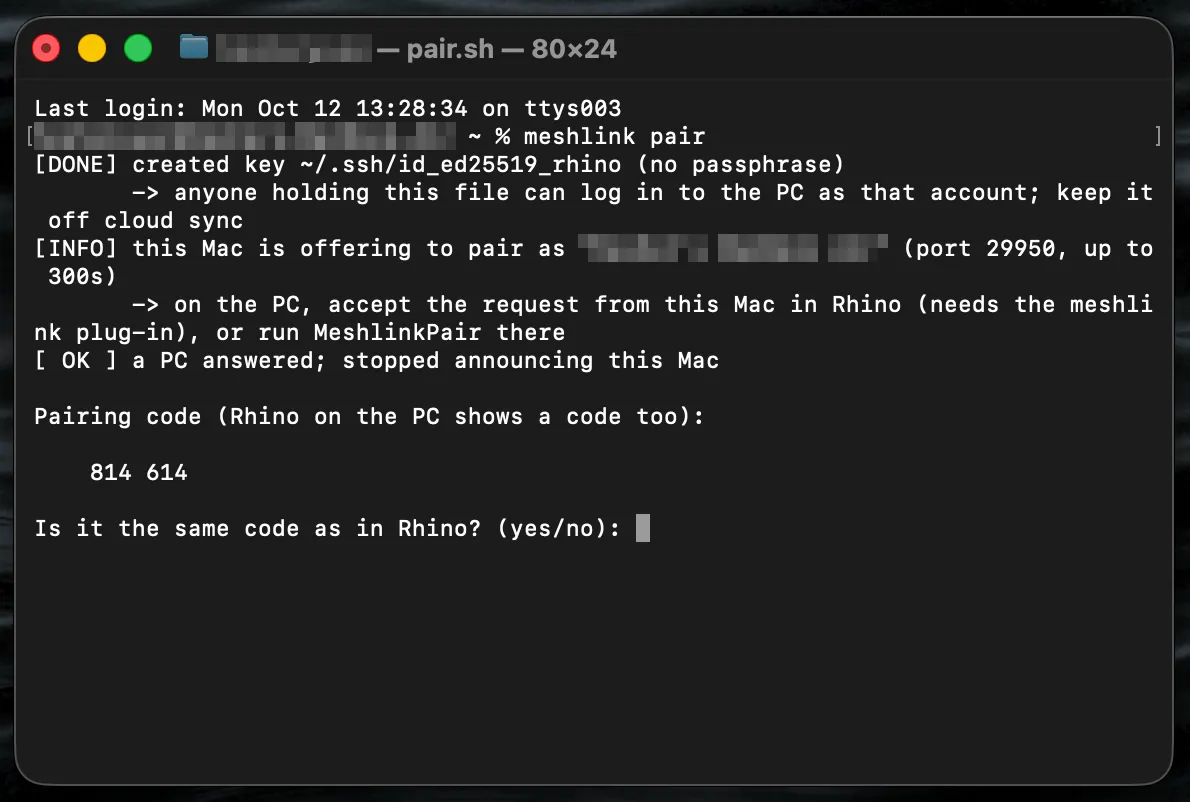
The same code on both screens. The Mac’s name and the account are pixelated.
The plug-in is C# on .NET 8. McNeel’s getting-started guide for Windows builds plug-ins in Microsoft’s Visual Studio, but this one never went near it. It was built entirely on the Mac with the .NET SDK, against RhinoCommon from NuGet, and packaged with McNeel’s Yak tool. The PC only ever saw the finished plug-in. The bash side and the C# side are checked against the same test vectors, which were generated separately in Python.
Pairing and the plain-SSH setup ended up shipping together, in 0.3.0-dev. The first stable release will be 0.3.0.
Things that bit me
The project keeps a numbered list of pitfalls, 23 so far. These are the ones I’d have wanted to read about before starting.
The worst one: the agent started the tunnel by itself. I hadn’t started the tunnel that evening, so Codex’s first tool call failed with “could not connect”. Codex found the tunnel script in the repository and ran it. Inside its sandbox, ssh wasn’t allowed on the network and failed with Operation not permitted. The script read that as “the PC isn’t reachable yet” and kept retrying every 60 seconds. Codex then asked for permission and started a second copy outside the sandbox, which worked. When I checked at 1:47 that night, both copies were still running under the open Codex session, and the sandboxed one had been retrying for about two hours and forty minutes. The first fix was a line in the repository’s instructions for agents: never start the tunnel, hand it to the user. The real fix was the SSH stdio connection, which has no tunnel to start. The script now also recognises that error and stops.
“Connected” doesn’t mean it works. rhinomcp starts happily when Rhino isn’t listening, Codex shows it as connected, and the first tool call fails. With the tunnel it was worse: ExitOnForwardFailure only checks the local end, and of the three port settings only two may change together. The only check that means anything is a real read-only tool call, which is why doctor ends with one.
bash puts off traps while a foreground command runs. An early tunnel script ran ssh in the foreground, so a SIGTERM sent to the script waited for ssh to exit on its own, which it never did, and left an orphan holding the port. (Ctrl-C hides this, because it goes to the whole process group.) Every blocking step now runs in the background under wait, which a signal does interrupt. The tests can’t even send SIGINT in the environment they run in, so they imitate Ctrl-C with a SIGHUP, and after every change to that line I press the real Ctrl-C by hand.
A network drop leaves processes behind on Windows. When the PC’s Wi-Fi went off without a clean disconnect, the Mac’s ssh gave up within a minute, but the Windows sshd, on its default settings, never noticed. rhinomcp.exe and two Python processes, about 90 MB, were still there after the network came back. ClientAliveInterval 15 in sshd_config clears them in about a minute. Oddly, the first batch of orphans did disappear one evening, sometime between 22:42 and 23:27, with sshd and Rhino still running. I never found out why.
Windows OpenSSH is picky. Keys for administrator accounts go in a separate file under ProgramData, and sshd silently ignores that file unless its permissions are exactly right, which means exactly two entries. You can’t even trust the group’s name (on a German Windows it’s Administratoren), so the script uses its SID. And error messages from the PC come back in the local code page rather than UTF-8, which on a Chinese Windows means GBK.
The tools around it had surprises too. Using codex mcp add to replace an entry rewrote the whole config.toml. Every comment was gone, and the entry lost its environment, startup timeout and tool approvals. meshlink now changes just two lines and has Codex read the file back. macOS tar writes the packer’s login name into every archive, which I only noticed while checking the first release for personal details. And the first version of the one-line installer asked GitHub’s API for the newest release and got a 403 on its very first request: anonymous requests are limited to 60 an hour per public address, and something else on the same network had already used them up. It reads the releases Atom feed now.
Working with the agents
Claude Code wrote most of the code and docs. Codex was the client on the other end, the one actually working in Rhino. My part was deciding what to build, running anything that touched a real machine, and reading. A lot of reading.
What surprised me most was that early on, not putting too many limits on the agents gave better results. As the work went deeper, the most important thing was to keep converging, building on what that open phase had turned up. I think this matters a lot.
You can see it in the project’s history. The first two weeks went wide. On September 24 we talked about letting Codex control the whole Windows PC. On September 28 there was a survey of MCP servers for Revit, AutoCAD and general desktop control, and a plan for a general bridge from the Mac to any MCP server on Windows. On September 30 I cut all of that and kept Rhino. The next day the first release got its scope: Codex only, Windows 10 only, three commands. The cutting didn’t stop there. Later I closed a documentation PR I’d opened upstream, kept a Windows install script an agent had written out of the project, and put off a signed Mac installer.
It’s a lot like a design project. Concept is where you open things up; by DD you should be closing decisions, not opening new ones.
Converging also means writing things down, because separate sessions don’t remember. A new session doesn’t know what the last one decided, or why. What helped:
- An
AGENTS.mdthat says how to work here, including what never to do (start the tunnel, push, run the Windows script on my PC) and which odd-looking details in the tunnel script must not be “simplified” away. - A decision log, 36 entries so far, each with the options and the reason. Commits and code comments cite the number instead of arguing it again.
- A short handoff note at the top of the project notes, rewritten whenever I stop.
- Results that say what kind of result they are: checked just now, from an earlier session, or only run against fakes. “The tests pass” never stands in for “it works on the PC”.
- About 430 test assertions (367 in bash, 62 in .NET) that run against a fake
ssh,codex,dns-sdandcurlin a temporary home directory, so they never touch my real config. GitHub Actions runs them on macOS. - Checklists for the real PC, which I go through step by step.
The agents made mistakes, and so did I. One set of instructions ended a command with a Chinese full stop, I copied it along with the command, and ended up with a spare test key that had “。” in its file name. An empty variable once made an awk splice delete 867 lines of the project notes; it was caught and restored before anything was committed, and line splices now check their numbers first. Edits to Chinese text sometimes slipped in U+FFFD replacement characters, so every commit is now checked for them.
Trying it
The 0.3.0-dev prerelease is a demo, tested on one PC with UAC turned off, so expect rough edges.
On the PC, install rhinomcp from Rhino’s Package Manager, drag the meshlink .yak from the release onto Rhino, and install OpenSSH Server with this line in an elevated PowerShell (it downloads from Windows Update and can take a few minutes):
Add-WindowsCapability -Online -Name OpenSSH.Server~~~~0.0.1.0; Set-Service sshd -StartupType Automatic; Start-Service sshdOn the Mac:
curl -fsSL https://raw.githubusercontent.com/rigelmansid/meshlink/main/get.sh | bashThen, with Rhino open, run meshlink pair, check the codes, and run meshlink client codex. meshlink only sets up Codex for now. The README has the details, and a manual route for networks where the two machines can’t see each other.
Where it stands
Checked on one Windows 10 22H2 PC with UAC off, Rhino 8 and Codex CLI:
- manual setup, the PowerShell script and
doctor, end to end with a real tool call; - pairing, unpairing, and installing, removing and reinstalling the plug-in from its package;
- the one-line installer on my own Mac;
- Codex over SSH stdio, including a full modeling run: the Parthenon in the GIF at the top, 565 objects, built on 2026-10-12 right after a fresh pairing (the truck was built back in the tunnel days).
Not checked yet: a PC with UAC on, Windows 11, and a fresh machine that has never seen any of this, including the OpenSSH line on a PC that doesn’t have OpenSSH yet. That’s why 0.3.0-dev is a demo and not a release.
On security: anyone who can use the SSH key can run any command as that Windows account, and rhinomcp’s code tools can do the same through Rhino, with Rhino’s rights. So log in with a dedicated standard account, and don’t let Rhino run elevated. My own test PC has UAC turned off, which is exactly the case that warning is about, and meshlink doctor reminds me every time I run it. The setup guide in the repository has a section on this.
What’s next
Next is testing on a fresh Windows machine, then the first stable release, 0.3.0. After that, a Mac installer you can double-click, which needs a signed package and an Apple developer account first.
The bigger pieces from the top of this post don’t exist yet: a local model in place of Codex, several PCs at once, and programs other than Rhino. Each of those programs needs its own MCP server, the way Rhino has rhinomcp, and that part is moving. Autodesk now has official MCP servers for Revit and AutoCAD, both still tech previews that run inside the program (the Revit one needs Revit 2027.2), and there are community-built ones as well.
Thanks to Jingcheng Chen for rhinomcp, which does the hard part inside Rhino. The code, the setup guide and the full list of pitfalls are at github.com/rigelmansid/meshlink.